Leadership AI Agents 5 min read
Your Website Needs an AI Agent Access Policy
On this page
Imagine a travel site that lets signed-in customers hold a room for a few minutes while they finish booking. A customer asks an AI assistant to find the best hotel for next weekend. The assistant, being thorough, holds rooms at twenty hotels while it compares them.
The customer wanted a good answer. The site wanted a booking. Instead, twenty rooms are off the market for a search that ends in one sale, at best.
Every one of those requests could pass the site’s checks: a real account, a normal browser, a sensible pace. Nothing was hacked. Whether the business accepts that use of its inventory is still a decision someone has to make, and then something in the system has to enforce it. That’s an AI agent access policy. This post covers both halves: what to decide, and how to put it in place.
TL;DR
- “Is this an AI?” is the wrong question. Ask what the request is doing, and whether your business wants it done.
- Label your traffic first: verify crawlers and agents by their published addresses or signatures, and treat a claim you can’t verify as an ordinary visitor.
- Put limits on business objects, not connections: holds per customer, across every session, enforced in the application.
- Give agents a proper way in: data they can read without scraping, scoped and revocable access for customers’ agents, and the customer’s own confirmation before money moves.
- Refuse clearly, measure completed tasks and blocked customers, and give each workflow an owner.
Not every agent is the same visitor
#One AI company can send you three different kinds of traffic. OpenAI’s documentation of its crawlers lists them separately:
- GPTBot collects content that may be used to train its models.
- OAI-SearchBot indexes sites for ChatGPT’s search results.
- ChatGPT-User visits a page only when a person asks ChatGPT something that needs it. OpenAI says it isn’t used to crawl the web automatically, and adds: “Because these actions are initiated by a user, robots.txt rules may not apply.”
That last one is the interesting case. It isn’t a crawler working for a company. It’s an agent working for one of your customers, or a future one. Blocking it can mean blocking a sale.
So I’ve stopped asking whether traffic is AI. Modern automation keeps sessions, runs JavaScript and arrives from ordinary-looking networks, so “does it look like a browser?” no longer tells you much. And the reverse holds too: a VPN or a cloud address doesn’t prove abuse, because plenty of real customers use both. What matters is the action.
Decide what you permit
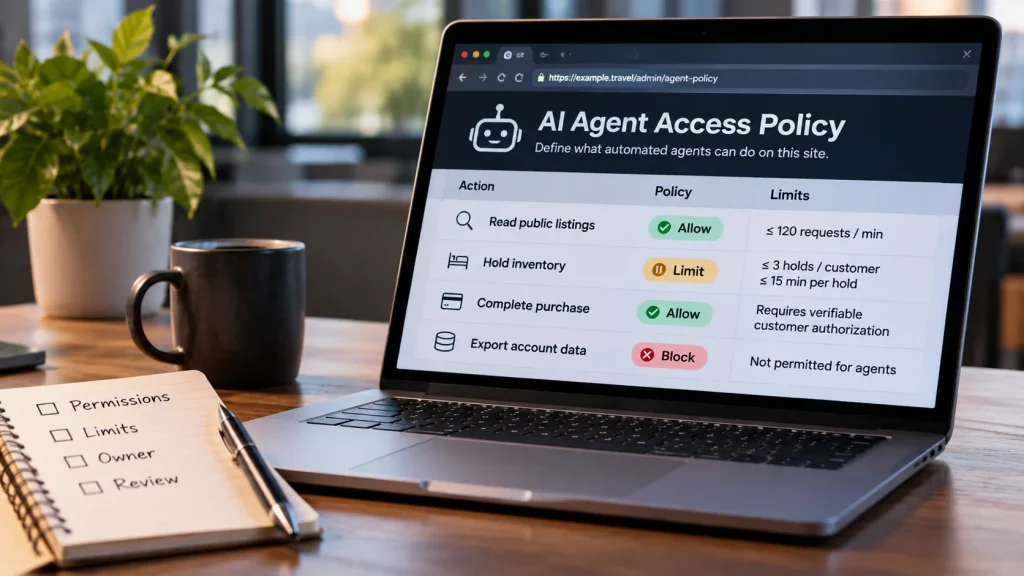
#I’d start with a short table of the actions that matter to the business, and decide each one. Here’s an example for a service that sells limited inventory:
| Action | Why the business wants it | The boundary to decide |
|---|---|---|
| Read public listings | Customers discover and compare offers | Which uses are fine, at what volume and cost |
| Hold inventory | Give a customer time to finish a purchase | How long, how many, and how many holds at once |
| Complete a purchase | Turn intent into revenue | Proof that the customer authorized this order and payment |
| Export account data | Serve an approved customer or partner workflow | Which records, to whom, for what purpose |
Behind every row sit three separate questions. Which agent sent the request? What did the customer authorize it to do? And does your service allow that action here? A verified agent answers only the first. A customer can authorize an assistant to book a hotel; whether that assistant may hold twenty rooms is still the hotel site’s call.
How to put it in place
#1. Label the traffic you already get
#Bots announce themselves in the user agent, but anyone can type “GPTBot” into a request. The big operators let you check:
- Google: run a reverse DNS lookup on the address, check that the name ends in
googlebot.com,google.comorgoogleusercontent.com, then look the name up again and confirm it points back to the same address. Or match the address against Google’s published lists of crawler and fetcher ranges. Google’s guide has both methods. - OpenAI: it publishes a list of addresses for each of its three agents (
gptbot.json,searchbot.jsonandchatgpt-user.json), linked from the same documentation as above. - Signed agents: with Web Bot Auth, a bot signs its requests. It sends
Signature-Input,SignatureandSignature-Agentheaders using HTTP Message Signatures (RFC 9421), and publishes its public keys at/.well-known/http-message-signatures-directory. If your site sits behind Cloudflare, it can check these for you.
That gives every request one of four labels: verified crawler, verified agent, unverified automation, or ordinary visitor. A claim you can’t verify gets treated as an ordinary visitor. It isn’t punished, it just isn’t trusted. Before changing any rule, I’d collect two weeks of traffic with those labels per action. You’ll learn more from that than from any vendor demo.
2. Put limits on business objects, not connections
#The twenty-room problem can’t be solved per IP address or per browser session, because each hold looks reasonable on its own. Count holds where the business counts them: per customer account, and also per payment card and per email address, across every session and device, inside the booking service itself. When the limit is reached, refuse the next hold with a clear message, and let the customer release one to make room.
Reading public pages is different. There, rate limits at the edge are the right tool, set per label: generous for the verified crawlers you want, stricter for unverified automation. Robots.txt states your preferences to the crawlers that respect it, and nothing more. Its standard, RFC 9309, says so itself: “These rules are not a form of access authorization.”
3. Give agents a proper way in
#Agents that can do the job properly have less reason to scrape. Three doors cover most cases:
- For reading: publish the facts in a form machines can read. That can be schema.org markup for products and offers in your pages, a product feed, or a read-only API with stated limits.
- For acting on a customer’s behalf: offer an API behind OAuth, where the customer grants the agent a scoped, expiring and revocable token, say “search and hold, at most two holds”, instead of handing over their password. If agents will reach you through the Model Context Protocol, its authorization spec builds on OAuth 2.1 and requires tokens issued for your server specifically.
- For money: before charging, require the customer’s confirmation in their own session or app. Or accept signed mandates once your payment provider supports them. Google’s Agent Payments Protocol describes a signed record of the user’s instructions, such as price limits, and a separate signed approval of the exact cart.
4. Refuse clearly
#Agents read error responses, so make yours useful. Too fast gets a 429 with a Retry-After header. Not allowed gets a 403 with a one-line reason and a link to the door the agent should use instead. Then add a contact address for appeals, because your labels will sometimes be wrong. A clear refusal steers a well-built agent to the right route. A silent failure or a CAPTCHA just makes it retry, or give up on your site.
5. Measure, and give each workflow an owner
#For each important workflow, I’d name three people: one who decides what automation is acceptable, one who can change the control, and one who handles exceptions. In a small company that can be one person. It just has to be settled before the first good customer gets blocked.
Then track what the policy is for. For the travel site, that’s holds created against bookings completed, holds that expired without a sale, verified agents that finished their task, and real customers who hit a refusal. A count of blocked bots tells you nothing on its own. Report unlabelled traffic separately: an unknown session isn’t a success or a failure, it’s a gap in what you know.
Review it monthly, and end each review with decisions: which permissions stay, which limits change, and who makes the change. That’s how the policy keeps up with how customers actually use your site, instead of with whatever the assistants decide to try next.
Got it working, or hit a snag?
Share your setup, a fix or a question. Markdown and code blocks work.
Replying to
How comments and emails are handled: Privacy.