Programming .NET 20 min read 2 comments
.NET 10 vs .NET 11 for a Small API: Faster, Easier or Riskier?

On this page
.NET 8 and .NET 9 both reached end of support on November 10, 2026, the day .NET 11 shipped. If you run a small ASP.NET Core API on either of them, you’re upgrading now, and the choice is between .NET 10 and .NET 11.
The usual advice is to pick the long-term support release, and .NET 10 is one. This time that advice decides less than it seems. Microsoft extended standard-term support from 18 to 24 months, starting with .NET 9. So .NET 11, a standard-term release, is supported from November 10, 2026 to November 14, 2028. That’s the same day .NET 10’s support ends. Both get the same servicing, and both spend their last six months on security fixes only. Whichever you pick, you upgrade again by November 2028.
So the choice comes down to three questions. Is .NET 11 faster for a small API? What does it make easier? And what can go wrong when you move to it? I built one small API to answer the first, rewrote a few typical endpoints both ways to answer the second, and went through Microsoft’s breaking-change lists and the bugs people reported in the first days to answer the third. I tested the final releases: .NET 11.0.0 against .NET 10.0.15.
TL;DR
- Support doesn’t decide it anymore. .NET 10 (long-term) and .NET 11 (standard-term) are both supported until November 14, 2028.
- Once warm, .NET 11 is faster: 5% to 9% more requests per second on framework work. With a database in the path, PostgreSQL set the pace for both, and .NET 11 still came out 4% ahead.
- In a container limited to one CPU, .NET 11 needs about 30 seconds to reach full speed, roughly 15 seconds longer than .NET 10. The runtime keeps postponing its optimized code. One environment variable removes the wait for both versions, and then .NET 11 leads from the start.
- .NET 11 makes real work easier: validation rules that query the database, compiler-checked result types, smaller compressed responses, and useful request traces without an extra package.
- Check the risks first. On x64 it needs an x86-64-v2 CPU. OpenAPI documents default to version 3.2. Container images come only on newer Linux bases. Npgsql’s EF Core provider for 11 is still a release candidate. And 11.0.0 ships with a few bugs, one of them serious.
Is .NET 11 faster?
#The test app is a minimal API with two endpoints. /json returns a fixed object, so it measures the framework: routing, Kestrel and JSON serialization. /products/{id} reads one row by primary key from PostgreSQL and returns the same shape. That’s a typical small-API call.
app.MapGet("/json", () => Results.Ok(new Product(42, "Product 42", 4200)));
app.MapGet("/products/{id:int}", async Task<IResult> (
    int id, NpgsqlDataSource source, CancellationToken cancellationToken) =>
{
    await using var command = source.CreateCommand(
        "SELECT id, name, price_cents FROM products WHERE id = $1");
    command.Parameters.AddWithValue(id);
    await using var reader = await command.ExecuteReaderAsync(cancellationToken);
    if (!await reader.ReadAsync(cancellationToken))
        return Results.NotFound();

    return Results.Ok(new Product(reader.GetInt32(0), reader.GetString(1), reader.GetInt32(2)));
});
The database has 10,000 rows, and the load visits all of them. Data access goes through Npgsql 10.0.3, with one pooled data source capped at 32 connections. There’s no EF Core, so the comparison doesn’t mix in an ORM upgrade. Both versions build from the same source. Only the target framework, the SDK and the runtime image change, as in a normal upgrade.
Everything runs in Docker, with fixed limits. The API gets 1 CPU and 512 MiB, which is a small VM or a modest container. PostgreSQL 17 gets the same, warm, on the same private network. The load generator, k6, gets 8 CPUs; “How I tested” below explains why it needs that many. k6 runs 32 virtual users at a fixed concurrency over kept-alive connections, and every response is checked for the right row, not just a 200. Each run starts a fresh container, warms each endpoint for 10 seconds and measures for 20. I ran six repeats and alternated which version went first, on a machine that ran nothing else.
Results with default settings
#| /json, after a 10-second warm-up | .NET 10.0.15 | .NET 11.0.0 |
|---|---|---|
| Requests per second, median | 118,808 | 82,869 |
| Range over 6 runs | 113,658 to 125,629 | 76,600 to 87,321 |
| Median latency (p50) | 0.15 ms | 0.27 ms |
| p99 latency, median of runs | 0.70 ms | 0.74 ms |
| API CPU per request, median | 8.4 µs | 12.0 µs |
| /products/{id}, after a 10-second warm-up | .NET 10.0.15 | .NET 11.0.0 |
|---|---|---|
| Requests per second, median | 17,367 | 18,095 |
| Range over 6 runs | 16,800 to 17,491 | 18,037 to 18,221 |
| Median latency (p50) | 0.45 ms | 0.44 ms |
| p99 latency, median of runs | 72.0 ms | 71.2 ms |
| PostgreSQL CPU, median | 1.00 core | 1.00 core |
| API CPU, median | 0.41 cores | 0.36 cores |
Neither version had errors.
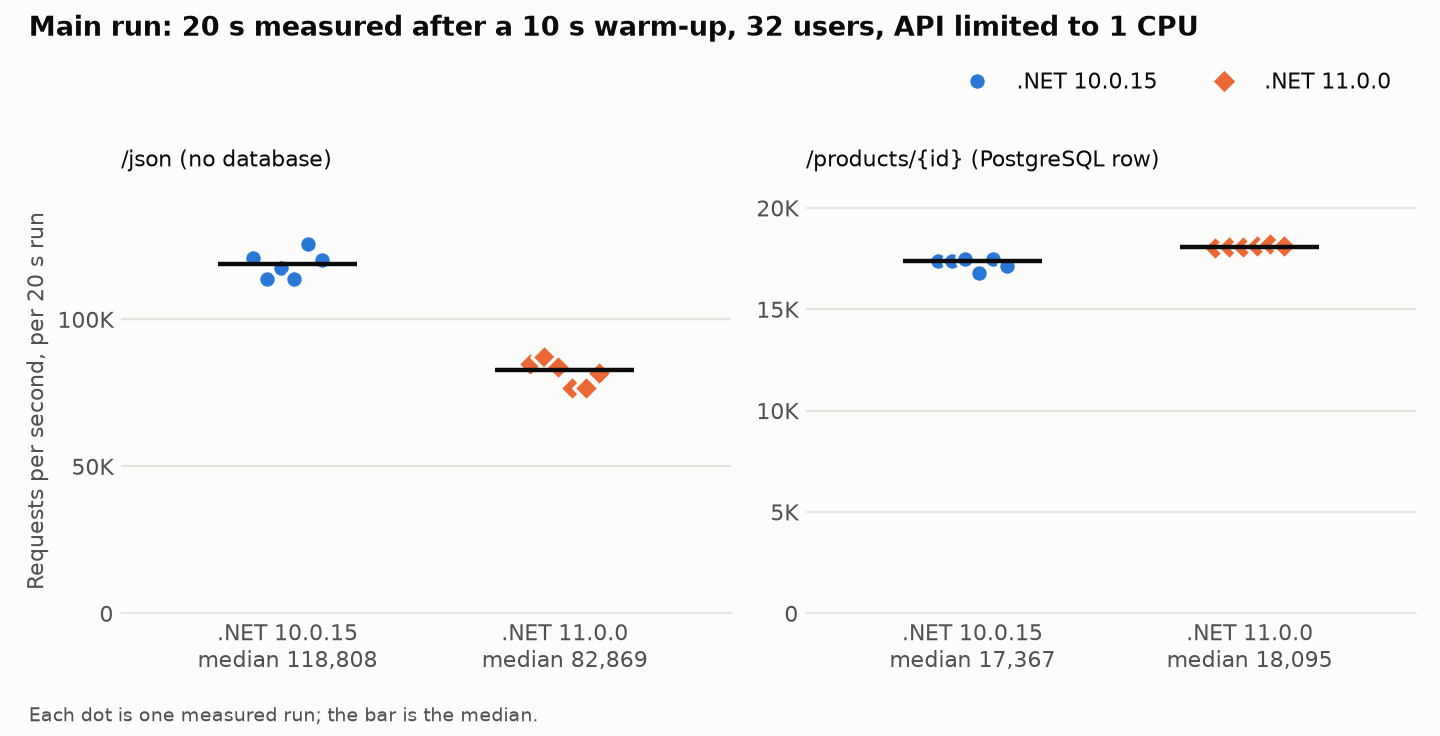
On /products/{id}, PostgreSQL was the limit. It used its full CPU and was throttled in every scheduling period, in every run, for both versions. .NET 11 still served 4% more requests, and its API used about 12% less CPU doing it. The 70 ms p99 fits the same picture: a container that runs out of CPU time is paused until the next period, and the requests it holds wait.
On /json, the API was the limit, and .NET 11 looks 30% slower. That gap turned out to be about warm-up, not speed.
Warm-up is the real difference
#The main run’s 10-second warm-up is too short for .NET 11 on one CPU. So I measured the warm-up itself: three fresh containers per version, /json at 32 users, six back-to-back 15-second windows starting the moment the API first answered.
| Window starts after the first answer | .NET 10.0.15, requests per second | .NET 11.0.0, requests per second |
|---|---|---|
| 0 s | 84,121 (82,340 to 84,460) | 80,371 (76,822 to 81,227) |
| 16 s | 135,956 (131,907 to 143,797) | 103,236 (87,204 to 103,790) |
| 32 s | 145,547 (145,420 to 153,358) | 152,587 (151,768 to 160,901) |
| 48 s | 148,627 (146,895 to 148,782) | 160,338 (157,778 to 161,473) |
| 64 s | 147,967 (147,152 to 152,835) | 158,614 (155,805 to 160,956) |
| 80 s | 149,367 (149,343 to 149,515) | 156,709 (156,435 to 160,452) |
Each cell is the median of three containers, with the range in brackets.
.NET 10 was close to full speed in its second window. .NET 11 needed one more. In the window that starts 16 seconds in, it served 24% fewer requests, which explains most of the main run’s gap. From 32 seconds on, .NET 11 was ahead, by 5% to 8%. Once warm, the API’s CPU per request was 6.7 µs for .NET 10 and 6.3 µs for .NET 11. I repeated the whole curve the next morning and got the same shape: 34% behind in the second window, 7% to 9% ahead after it.
Why .NET 11 warms up later
#.NET doesn’t compile your code to its fastest form straight away. A method first runs as quickly compiled code, or as code precompiled into the framework (ReadyToRun). The runtime counts calls, and methods that turn out to be hot get recompiled with full optimization in the background. That’s tiered compilation.
Call counting doesn’t start immediately. The runtime first waits for a quiet moment in which no new code starts running: 100 ms, as its design notes describe, and any new code resets the timer. When the process sees a single CPU, the runtime multiplies that wait by 10. So in a 1-CPU container, every new method called restarts a one-second pause.
I traced the runtime’s own tiering events during a /json run. After the first five seconds, .NET 11 restarted that pause 21 times, .NET 10 10 times. The methods that restarted it sit on the request path: Kestrel’s HTTP parser and timeouts, routing, socket callbacks. They run on every request from the first second, yet they counted as new code between 13 and 30 seconds in. My reading is that each time the runtime recompiles a caller, the new version calls some helpers that the old one had inlined. Each helper’s first standalone call then counts as new code. Why .NET 11 triggers twice as many of these, I can’t say for sure. The behaviour itself is old: an open runtime issue from 2022 describes hot methods stuck unoptimized “for seconds” for this reason.
The fix is one line
#The runtime reads two settings that control this pause, so I measured both, on the same quiet machine:
DOTNET_TC_DelaySingleProcMultiplier=1removes the 10-times multiplier for single-CPU processes.DOTNET_TC_CallCountingDelayMs=0removes the pause altogether.
With either one, the gap disappears. Here is the main comparison again, with the same method and the multiplier set to 1:
After a 10-second warm-up, DOTNET_TC_DelaySingleProcMultiplier=1 | .NET 10.0.15 | .NET 11.0.0 |
|---|---|---|
| /json, requests per second, median of 3 | 147,789 | 160,389 (+8.5%) |
| /products/{id}, requests per second, median of 3 | 17,630 | 18,327 (+4.0%) |
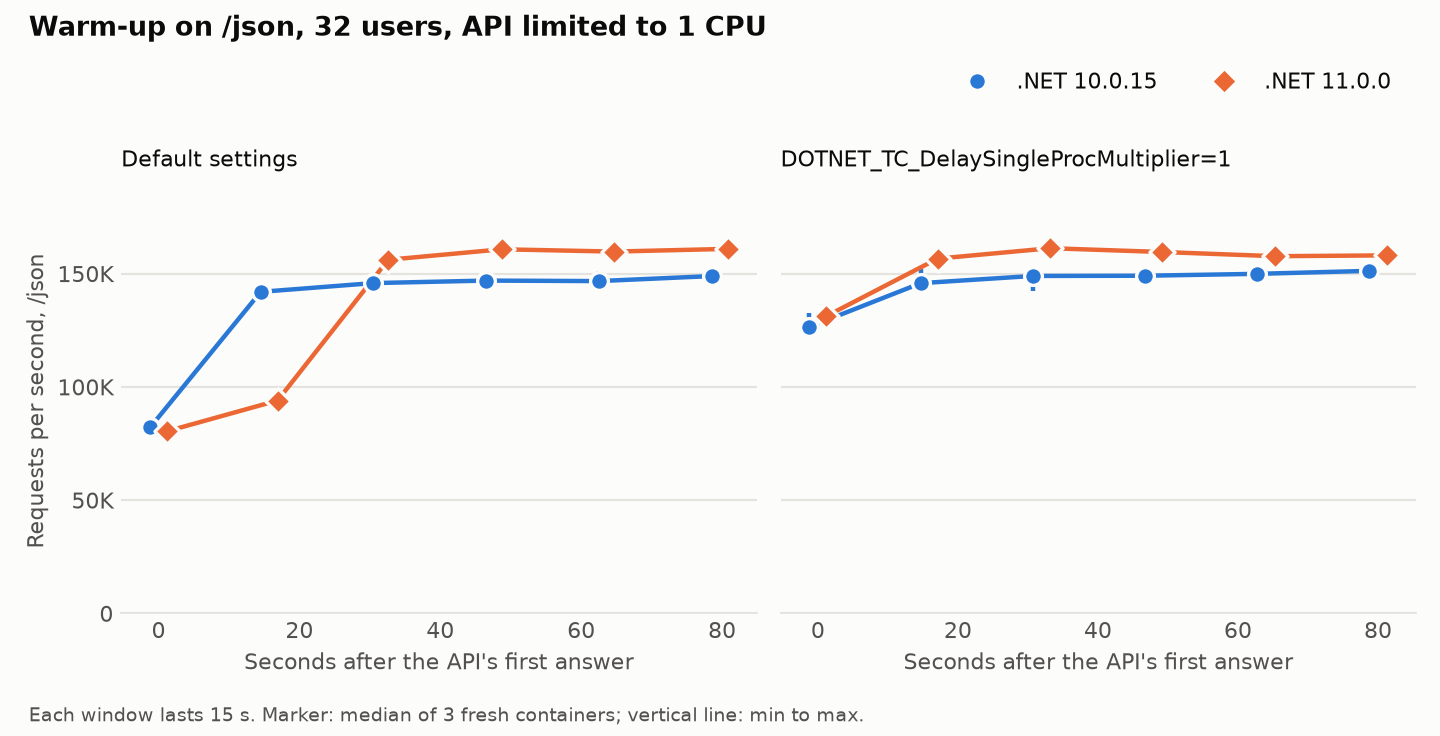
Both versions gain from the setting. .NET 10’s /json result rises 24%, and both serve over 125,000 requests per second within the first 15 seconds instead of about 80,000. Startup didn’t suffer. With the setting, the first correct /products/42 came after 282 ms for .NET 10 and 279 ms for .NET 11; with defaults, 290 ms and 281 ms.
DOTNET_TC_CallCountingDelayMs=0 gave the same picture: .NET 11 between 5% and 9% ahead in every window, including the first. Two other things also close the gap. Giving the API two CPUs works, because the multiplier only applies to single-CPU processes. Turning off dynamic PGO (DOTNET_TieredPGO=0) works as well, but it costs .NET 11 about 5% of its warm speed.
One caution: Microsoft doesn’t document either setting. The runtime’s source declares TC_CallCountingDelayMs as a public setting and TC_DelaySingleProcMultiplier as an internal one. Both worked in the shipped 11.0.0 and 10.0.15 runtimes. If you deploy 1-CPU containers, set one of them in your container image, measure your own warm-up with and without it, and keep the one that helps.
That matters only in the first half-minute after a start, and only if the API is at full CPU from its first second. A rolling deploy behind a load balancer won’t feel it much. A single instance restarted into heavy traffic will.
Concurrency, a second CPU, startup and memory
#- Concurrency. At 8, 32 and 128 users,
/products/{id}stayed database-bound for both. Sixteen times more users bought 4% to 8% more throughput and about sixteen times the median latency. At 128 users, .NET 10 was 2% ahead, within the noise of three runs. - Two CPUs for the API. On
/products/{id}, .NET 10 served 17,094 requests per second and .NET 11 17,460: the same as with one CPU, because the database was still the limit. On/json, two CPUs removed .NET 11’s warm-up gap. - Startup. It was a tie. From Docker starting the container to the first correct
/products/42, .NET 10 took 290 ms and .NET 11 281 ms (medians of eight). - Memory. Both were small. Three seconds after the first answer, .NET 10 used 24.1 MiB and .NET 11 24.9 MiB. Under load, both used about 45 to 60 MiB.
What the speed results mean
#If your API reads from a database, the database will probably set the pace, whichever .NET you run. On pure framework work, .NET 11 is the faster runtime once warm. The cost per request is tiny either way. Take the worst number here, 12 µs during .NET 11’s warm-up: at 1,000 requests per second, that’s 1.2% of one core. Speed is a small reason to pick .NET 11, not a reason to avoid it. On a 1-CPU container, set the tiering setting either way.
What .NET 11 makes easier
#I took the features in Microsoft’s .NET 11 release notes that touch everyday API code and wrote each one both ways: the idiomatic .NET 10 version and the .NET 11 version. Every result below is what the code did on 10.0.15 and 11.0.0, not what the release notes promise.
Validation rules that query the database
#.NET 10 already validates Minimal API requests: call AddValidation(), and attributes such as [Required] and [Range] run before your handler. But they’re synchronous. A rule like “this SKU must not exist yet” needs the database, so in .NET 10 it goes into the handler:
// .NET 10: the attributes run automatically, the database rule by hand.
app.MapPost("/products", async Task<Results<Created<Product>, ValidationProblem>> (
    NewProduct input, Catalog catalog, CancellationToken ct) =>
{
    if (await catalog.SkuExistsAsync(input.Sku, ct))
        return TypedResults.ValidationProblem(new Dictionary<string, string[]>
        {
            [nameof(NewProduct.Sku)] = [$"SKU {input.Sku} already exists."],
        });

    var product = await catalog.AddAsync(input, ct);
    return TypedResults.Created($"/products/{product.Id}", product);
});
.NET 11 adds asynchronous validation attributes, and AddValidation() runs them. The rule becomes an attribute on the model, and the handler only handles the happy path:
// .NET 11: [UniqueSku] sits on the Sku property, next to [Required].
public sealed class UniqueSkuAttribute : AsyncValidationAttribute
{
    protected override async Task<ValidationResult?> IsValidAsync(
        object? value, ValidationContext context, CancellationToken cancellationToken)
    {
        var catalog = context.GetRequiredService<Catalog>();
        return value is string sku && await catalog.SkuExistsAsync(sku, cancellationToken)
            ? new ValidationResult($"SKU {sku} already exists.", [context.MemberName!])
            : ValidationResult.Success;
    }

    // Required as well: callers that validate synchronously get this.
    protected override ValidationResult? IsValid(object? value, ValidationContext context) =>
        throw new NotSupportedException("UniqueSku needs asynchronous validation.");
}
It worked. A duplicate SKU got a 400 with the same errors.Sku message as the .NET 10 version.
For one rule on one endpoint, the .NET 10 version is shorter. The .NET 11 way pays off when several endpoints accept the same model, because the rule lives in one place. Two catches: you must also write the synchronous IsValid, and anything that validates synchronously gets that fallback instead. For options classes, for example, Microsoft’s docs say async validators run only at startup with ValidateOnStart().
Result types the compiler checks
#Small APIs often return “one of several shapes”: a product can be in stock, out of stock or discontinued. In .NET 10 you’d write that as an abstract record with three subtypes. The catch shows up in every switch over it. The compiler can’t know there are only three subtypes, so it warns unless you add a fallback arm, and most code does:
// .NET 10
public abstract record Availability;
public record InStock(int Quantity) : Availability;
public record OutOfStock(DateOnly? RestockDate) : Availability;
public record Discontinued(int? ReplacementId) : Availability;

var text = availability switch
{
    InStock s => $"{s.Quantity} in stock",
    OutOfStock o => "out of stock",
    Discontinued d => "discontinued",
    _ => throw new UnreachableException(), // without it: warning CS8509
};
When someone later adds a fourth case, say Preorder, that fallback arm hides it. The code compiles cleanly and fails at run time.
C# 15, the default language version for .NET 11, offers two fixes, and neither needs a preview flag. The first is a union, public union Availability(InStock, OutOfStock, Discontinued);. The second is a closed hierarchy, public closed record Availability; with the same subtypes. In both cases, the switch needs no fallback arm. When I added Preorder, the build warned, naming the case: “the pattern ‘Preorder’ is not covered.” That’s a warning, not an error. Add <WarningsAsErrors>CS8509</WarningsAsErrors> to the project file if you want it to stop the build.
The two differ once the value leaves your code as JSON:
| Returned from an endpoint as JSON | .NET 10 abstract record with [JsonPolymorphic] | .NET 11 union | .NET 11 closed record with [JsonPolymorphic] |
|---|---|---|---|
| Response body | {"status":"inStock","quantity":12} | {"quantity":12} | {"status":"inStock","quantity":12} |
| OpenAPI | anyOf with a discriminator | anyOf, no discriminator | anyOf with a discriminator |
| Read back with System.Text.Json | works | fails by default | works |
The union writes the bare case, with nothing saying which one it is. By default, System.Text.Json picks a union’s case from the JSON token kind, so it can’t tell two object cases apart: every object failed with “JSON value type ‘Object’ is ambiguous for union type ‘Availability'”. A .NET client of your own API would hit that. Even a simple union ProductKey(int, string) failed on a string under ASP.NET Core’s JSON defaults, because those let numbers arrive as strings. This is documented behaviour, not a bug. The documented fix is an attribute: [JsonUnion(TypeClassifier = typeof(JsonUnionTypeStructuralClassifier))] picks the case by its property names, and with it, both objects I tried read back correctly.
My take: use unions inside your code, and closed hierarchies for JSON your clients read. The closed hierarchy gives you the compiler check and keeps the type tag. If you do send unions over the wire, add the structural classifier and test every case.
Smaller compressed responses
#.NET 11’s response compression middleware adds Zstandard (zstd), turns it on by default, and prefers it when the browser accepts it. Chrome and Edge accept zstd from version 123 and Firefox from 126; Safari’s support is partial, so Safari users still get Brotli or gzip. This only matters if your app compresses its own responses. If a reverse proxy or CDN does it, the middleware isn’t in the path.
I measured with AddResponseCompression() and no options, on a real-world JSON shape: a page of 30 issues from GitHub’s API, 128 KB uncompressed.
| Encoding the browser gets | .NET 10 | .NET 11 |
|---|---|---|
| gzip | 20,886 bytes | 20,886 bytes |
| Brotli | 38,628 bytes | 38,628 bytes |
| zstd | not supported | 14,078 bytes |
| Chrome or Firefox (offers all three) | Brotli: 38,628 bytes | zstd: 14,078 bytes |
That Brotli number is not a typo, and it affects .NET 10 just as much. ASP.NET Core sets Brotli to its fastest level by default. At that level, .NET’s Brotli encoder compresses each write almost on its own, and this response was written in 4 KB pieces. Compressed in one piece, the same file is 15,101 bytes. Written in 4 KB pieces, it’s 38,626, almost twice gzip’s size. gzip and zstd don’t depend on the piece size, and Brotli doesn’t from the next level up.
If you stay on .NET 10, the fix is one setting, options.Level = CompressionLevel.Optimal for Brotli. That brought this response to 13,789 bytes, slightly smaller than zstd’s 14,078. The cost is CPU time. Compressing this 128 KB file on one core took 307 µs with Brotli Optimal, against 68 µs for zstd’s default level, 74 µs for Brotli’s fastest level and 55 µs for gzip’s fastest. Those are medians of three 10-second runs per encoder. So zstd comes within about 2% of Brotli’s best size for under a quarter of its CPU.
Request traces without an extra package
#ASP.NET Core has always started an Activity, .NET’s span, for every request. In .NET 10 it’s nearly empty. I attached a listener to the Microsoft.AspNetCore source and sent a request that throws.
- .NET 10: a span named
Microsoft.AspNetCore.Hosting.HttpRequestIn, with no tags and no error status, even for the 500. To get useful traces, you add theOpenTelemetry.Instrumentation.AspNetCorepackage. - .NET 11: a span named
GET /fail, with statusError. Its tags includehttp.request.method,http.route,http.response.status_code,url.path,server.address,user_agent.originalanderror.type=System.InvalidOperationException.
With the OpenTelemetry SDK, that’s .AddSource("Microsoft.AspNetCore") and no instrumentation package. If you keep the package after upgrading, Microsoft warns that you may get duplicate tags.
OpenAPI 3.2, and the rest
#- OpenAPI 3.2 is the default. The same app produced a 3.1.1 document on .NET 10 and 3.2.0 on .NET 11. It’s a breaking change, because tools that read your document may not accept 3.2 yet. To keep 3.1, set
options.OpenApiVersion = OpenApiSpecVersion.OpenApi3_1inAddOpenApi. Custom document transformers may also need changes, because the underlying library moved a major version. - Runtime async. Much of .NET 11’s own framework is compiled with it. I counted the methods built that way: Kestrel went from 0 in .NET 10 to 83, HttpClient from 0 to 119. Your own code stays on the classic compilation unless you add
<Features>runtime-async=on</Features>, and Microsoft still calls that a preview feature. I measured it on this API anyway: no difference beyond the run-to-run noise on either endpoint, warm or cold. Exception stack traces looked the same in both versions, with it on or off. .NET already cleaned those up. - Smaller items. A
[ShortCircuit]attribute skips the middleware pipeline for endpoints like health checks. Endpoint filters now run even when parameter binding fails. Validation messages can be localized without an extra package. LINQ gainsFullJoin, next to theLeftJoinandRightJointhat came in .NET 10.
What can go wrong when you upgrade
#The upgrade itself was one line in the project file: the target framework went from net10.0 to net11.0. These are the things to check before you make that change in production.
- The CPU. On x64, .NET 11 requires an x86-64-v2 processor. On older hardware it doesn’t start, and prints “The current CPU is missing one or more of the baseline instruction sets.” Microsoft says every chip that Intel and AMD still support meets it, so physical servers are rarely the problem. Virtual machines are the risk, because some are configured to present a generic, older CPU model. On Linux,
/lib64/ld-linux-x86-64.so.2 --help | grep x86-64-v2should print “supported”. There’s a second, quieter effect: the framework’s precompiled code now targets x86-64-v3 on Linux and Windows. A VM that hides AVX2 still runs .NET 11, but compiles more of the framework at startup, which adds to the warm-up above. - The OS. Ubuntu 22.04, 24.04 and 26.04, Debian 13, Alpine 3.23 and 3.24, and Windows Server 2016 and later are all supported.
- Container images. Microsoft publishes .NET 11 images on Ubuntu 26.04, Alpine 3.24, Azure Linux 3.0 and 4.0, and Windows Server 2025 only. There are none on Ubuntu 24.04 or Debian, even though both are supported as host systems, and the default
11.0tag is Ubuntu 26.04. .NET 10’s default tag stays on Ubuntu 24.04. Microsoft notes that newer base images may need a newer kernel or container runtime on the host. - The database packages. EF Core 11.0.0 is on NuGet. Npgsql’s EF Core provider for 11 was still at a release candidate the day after launch, and there was no Npgsql 11 driver. Npgsql 10 ran on .NET 11 in my test, but nothing official says it’s supported there. If you use EF Core with PostgreSQL and want matching releases from the start, check before you move.
- Maturity. 11.0.0 is the first build of its line, and it has bugs that 10.0.15 doesn’t. The next section has the ones I could confirm.
Besides OpenAPI 3.2, these are the breaking changes most likely to bite a small API:
IHost.RunAsyncandIHost.StopAsyncnow throw when aBackgroundServicefails.- Kestrel tightens HTTP protocol compliance.
- Nine
Microsoft.Extensions.*packages are now part of the framework, so explicit references to them raise warning NU1510, which fails builds that treat warnings as errors. - The ConcurrencyLimiter middleware is gone; use the rate limiter instead.
What others have reported, checked
#Plenty of problem reports appeared during the release candidates and in the first days after launch. I went through the ones a small API could hit, mostly in the dotnet GitHub repositories, and re-ran each on 11.0.0 and 10.0.15.
| Reported problem | What I found |
|---|---|
enumValue.Equals(nullableEnum) throws NullReferenceException when the nullable is null | Confirmed, and serious. With default settings, the call works until the method gets optimized, then throws: after 0.2 seconds in my test. .NET 10 never throws. The fix is in .NET 12’s code but not yet in 11. Until it ships, compare with == instead. |
ConfigurationBinder Get<T> and Bind are about 4 times slower | Confirmed. For a class with 50 properties: 34.8 µs and 27,176 bytes per call, against 8.8 µs and 17,584 bytes on .NET 10. It matters only if you bind configuration on a hot path. Microsoft recommends the source-generated binder for performance-sensitive code. |
| Async code and thread-pool continuations got slower | Not against .NET 10. The report compares later builds with an earlier release candidate. Against .NET 10, .NET 11 was faster in all four patterns I measured: Task.Yield 114 ns vs 197, a Task.Run continuation 144 ns vs 275, a TaskCompletionSource continuation 250 ns vs 445, a 10-deep async chain 607 ns vs 725. |
dotnet commands pause 4 to 9 seconds before exiting on machines outside Azure | Not reproduced here, with telemetry blocked from leaving the machine. The reporter says DOTNET_CLI_TELEMETRY_OPTOUT=1 removes the pause, if you see it. |
dotnet build --help shows “app” instead of “dotnet” | Confirmed, and cosmetic. |
| Trimmed publish of Blazor apps warns IL2101 | Still in 11.0.0 as a warning. It fails the publish only if trimming warnings are errors. The fix is planned for a servicing update. |
| Self-contained publish of a .NET 10 app with the .NET 11 SDK picks too old a runtime | Fixed in the final SDK: it picked 10.0.15. |
How to choose
#| If this describes you | Lean towards |
|---|---|
| You want to upgrade once and leave it until 2028 | Either. Both end on November 14, 2028. |
| You use EF Core with PostgreSQL and want matching releases now | .NET 10, until Npgsql ships its 11 releases |
| Your x64 servers or VMs may present an older CPU model | .NET 10, or check for x86-64-v2 first |
| Your deployments are pinned to Debian or Ubuntu 24.04 images | .NET 10, or move your base images too |
Your code compares enums with nullable enums through Equals | .NET 10 until the fix ships, or change those comparisons |
| Your clients or tools can’t read OpenAPI 3.2 | Either. On .NET 11, set the document version back to 3.1. |
| You check the database in several validation rules | .NET 11 |
| You model results with several shapes and want missing cases caught at build time | .NET 11 |
| Your app compresses large JSON responses itself | .NET 11. On .NET 10, set Brotli to Optimal. |
| You want request traces without the instrumentation package | .NET 11 |
| You run 1-CPU containers and restart into full traffic | Either, with the tiering setting above |
Microsoft’s own advice for teams leaving .NET 8 and 9 is .NET 10. That’s the cautious choice, and it’s a fine one. But this year, .NET 11 doesn’t cost you support time, and once warm it’s the faster of the two. If none of the risks above apply and you’d use what it adds, it’s the better place to land. Give it a servicing update or two if the enum bug touches your code.
How I tested
#A quiet machine
#Benchmarks of fast endpoints are easily skewed by anything else on the host, so nothing else ran during the measurements. Before every container started, CPU use outside the benchmark had to stay below a quarter of a core for 60 seconds. Any run that saw more while it measured was thrown away and repeated, not averaged in. The main run and its angles needed no repeats; the warm-up diagnosis needed two.
The load generator has to keep up
#My first setup gave k6 one CPU, like the other two containers. That can’t work, because k6 needs several cores to drive one fast API core. With one CPU, the /json numbers would have measured k6, not .NET.
So I added a check before measuring. On /json, for both versions, k6 must stay below 70% of its CPU limit and be throttled in under 5% of scheduling periods, while the API sits at its 1-CPU limit. With 4 and 6 CPUs, the check failed. With 8 CPUs, k6 used 5.5 cores (69%) for .NET 10 and 3.7 (46%) for .NET 11 in the main run, and the API was at its full core in both. Once warm, at 150,000 to 160,000 requests per second, k6 needed up to 7.1 of its 8 cores and was throttled in at most 2% of periods. The API still used its whole core. If you benchmark a fast endpoint and the numbers look flat, check the load generator before you trust them.
Tracing the warm-up
#To find the cause of the slow warm-up, I ran each image with the runtime’s JIT summary and with an EventPipe trace of its tiering events. The trace records each pause and resume of call counting, and the first call of every precompiled method. Those traces ran on a busy machine. They show when code gets compiled, not how fast it runs. Every throughput number in this article comes from the quiet runs.
Exact versions
#- .NET 10: runtime and ASP.NET Core 10.0.15, SDK 10.0.404, image
mcr.microsoft.com/dotnet/aspnet:10.0.15-resolute. - .NET 11: runtime and ASP.NET Core 11.0.0, SDK 11.0.100, image
mcr.microsoft.com/dotnet/aspnet:11.0.0-resolute. - Base system: Ubuntu 26.04 for both, because .NET 11 has no Ubuntu 24.04 images.
- Database: PostgreSQL 17.11 on Alpine 3.24. Data access: Npgsql 10.0.3. Load: k6 v2.3.0.
- Host: an AMD Ryzen 5 9600X (6 cores, 12 threads), running Linux and Docker.
Every image is pinned by digest. Both builds had no compiler warnings, both lock files resolved Npgsql 10.0.3 and nothing else, and both images run as the same non-root user with Server GC.
What this test doesn’t tell you
#- The host. It’s one small app on one machine. I alternated the versions and repeated every run, and the ranges are in the tables.
- The database. It’s small and warm, on the same host, with primary-key reads only: no joins, no EF Core, no network latency and no large data.
- The load. It’s a fixed number of users in a closed loop over keep-alive connections, without TLS. It isn’t a fixed arrival rate, and it isn’t overload.
- CPU and memory. The CPU figures come from container counters, not a profiler. I didn’t measure allocations or garbage collections in the API.
- The features. Each comparison is one small app written both ways, with an in-memory stand-in for the database in the validation example. The compression sizes are exact for that payload. Other JSON will compress differently.
- The warm-up cause. The trace shows what restarts the pause and how often. Why .NET 11 hits it more often than .NET 10 is my reading, not something I proved.
Got it working, or hit a snag?
Share your setup, a fix or a question. Markdown and code blocks work.
Replying to
How comments and emails are handled: Privacy.
Robert Florin
Great analysis! I especially liked the practical benchmarks and the attention to real-world deployment constraints. The warm-up differences are definitely something to keep in mind when moving to .NET 11.
Bogdan Florea Author
Thanks, Robert! Agreed, the warm-up behaviour is worth keeping in mind, especially with single-CPU containers.
I still think going straight to .NET 11 makes sense if you’re coming from .NET 9 or earlier, provided you’ve accounted for the compatibility requirements and known issues, and you’d benefit from the new features. If you’re already on .NET 10 and it’s working well, though, I wouldn’t necessarily upgrade just for the performance gains shown here. That would still be my view even without the warm-up difference.